

Overview
Share your roadmap with stakeholders by exporting it as an image, PDF, or CSV. The interactive export dialog lets you customize your export with a live preview before downloading.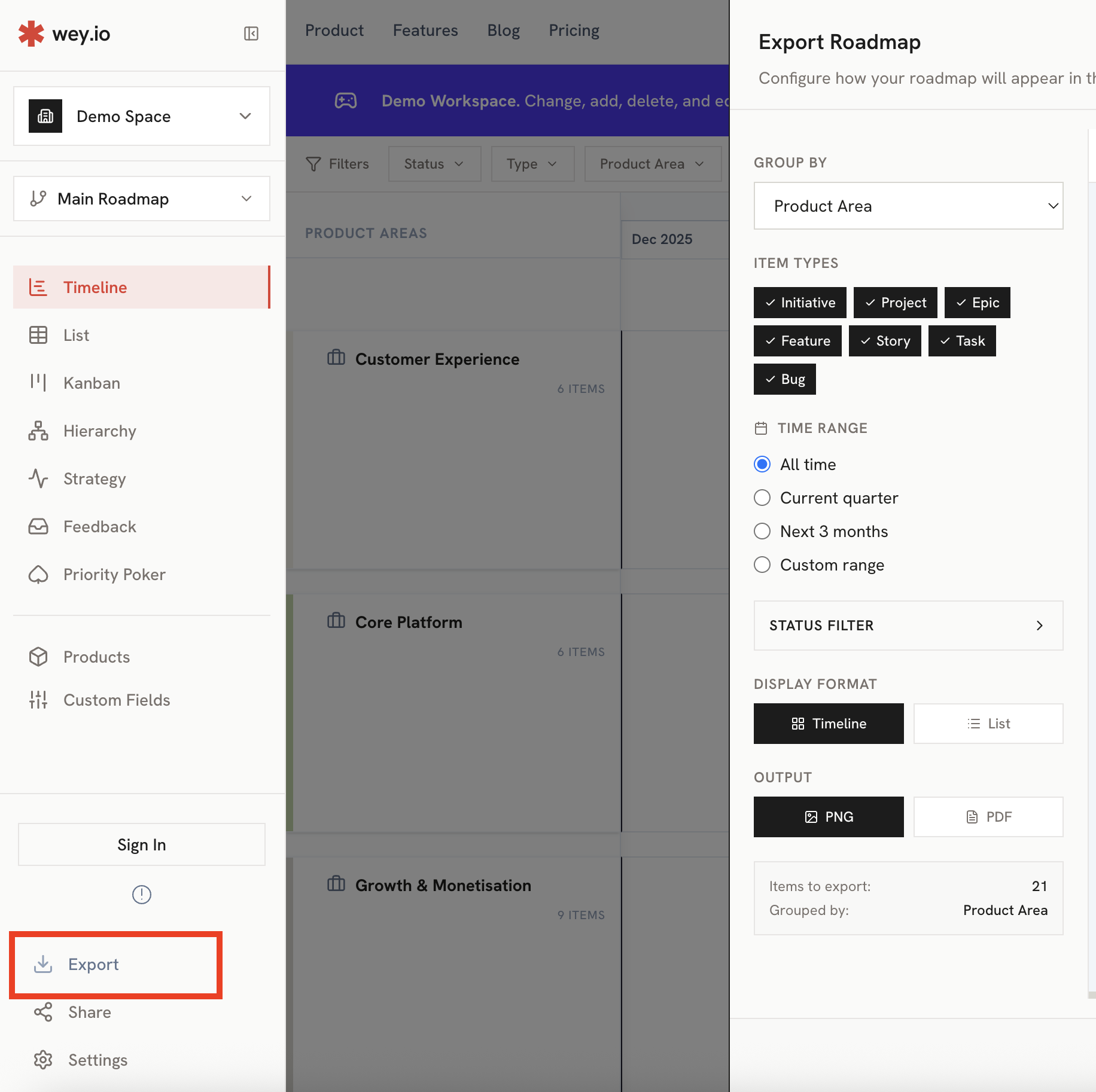
Export Formats
Using the Export Dialog
The export dialog provides a side-by-side configuration and preview experience:1
Open Export
Click the Export button in the sidebar or toolbar.
2
Choose Your Lens
Select how items should be grouped in the export (see Lens Options below).
3
Set Date Range
Choose a time period using presets or custom dates.
4
Filter Items
Toggle which item types and statuses to include.
5
Preview & Download
Review the live preview, then click Download for your preferred format.
Lens / Grouping Options
Choose how items are organized in your export, independent of your current view:Date Range Options
Filter items by time period:
Item Filtering
Control which items appear in your export:By Item Type
Toggle visibility for each type:- Initiatives
- Epics
- Stories
- Tasks
- Bugs
By Status
Show or hide items based on their status.Filtering lets you create focused exports—for example, showing only Initiatives and Epics for executive summaries.
Live Preview
The export dialog shows a real-time preview of your export:- Instant updates: Changes to lens, date range, or filters immediately reflect in the preview
- Scrollable: Navigate large roadmaps within the preview panel
- Accurate representation: What you see is exactly what you’ll download

Export Views
Timeline Export

- Items positioned on timeline
- Grouped by your selected lens
- Swimlanes with color coding
- Date headers and gridlines
List Export

- Hierarchical item structure
- All item details (name, type, dates, status)
- Grouped by product area
CSV Export
Spreadsheet export including:- All item properties
- Parent relationships
- Dates, status, and assignments
- Ready for further analysis or import
Export Quality
Exports are generated at high resolution:- 2x scale for crisp images on retina displays
- Automatic orientation (landscape/portrait) based on content
- Full data fidelity - items render from source data, not just visible items
Best Practices
Match Lens to Audience
Match Lens to Audience
Use Strategic Priority for executives, Product Area for team leads, Status for project managers.
Focus with Filters
Focus with Filters
Hide Tasks and Bugs for high-level presentations. Show all types for detailed planning docs.
Use Date Presets
Use Date Presets
Quick presets like “Current Quarter” save time and ensure consistency.
Preview Before Download
Preview Before Download
Always review the preview to catch any issues before generating the final export.
CSV for Data Work
CSV for Data Work
Use CSV export when you need to analyze data in spreadsheets or import to other tools.
Related
Share Links
Create live, shareable roadmap links.
Timeline View
Learn about the timeline view.